
Updated: July 16, 2026
When creating content for your website, writing great copy is only half the job. Search engines also need a clear understanding of your page’s structure. That’s where header tags come in.
Header tags help organize your content into logical sections, making it easier for both users and search engines to understand your page. A well-structured article improves readability, supports accessibility, increases the chances of appearing in featured snippets, and strengthens your overall on-page SEO.
Many website owners still believe that simply adding keywords to H1 and H2 headings is enough to rank on Google. In reality, modern SEO requires much more. Google evaluates content based on relevance, user intent, page structure, topical depth, and helpfulness—not just keyword placement.
In this comprehensive guide, you’ll learn everything about header tags SEO, including how H1, H2, and H3 tags work, how Google interprets them, best practices, common mistakes to avoid, and actionable strategies to optimize your content for both traditional search results and AI-powered search experiences.
What Are Header Tags in SEO?
Header tags, also called heading tags, are HTML elements used to organize web page content into a hierarchical structure. They range from H1 to H6, with H1 representing the main heading and H6 representing the least important subheading.
Think of header tags as the outline of a document:
- H1 – Main topic of the page
- H2 – Major sections
- H3 – Subsections under H2
- H4–H6 – Supporting details when additional structure is required
A proper heading hierarchy makes lengthy articles easier to scan and understand.
HTML Example
<h1>Header Tags SEO: Complete Guide</h1>
<h2>What Are Header Tags?</h2>
<h3>H1 Tag</h3>
<h3>H2 Tag</h3>
<h2>Best Practices</h2>
<h3>Common Mistakes</h3>
Although users mainly notice the visual formatting of headings, search engines read the HTML structure behind them to better understand your content.
Why Are Header Tags Important for SEO?
Header tags provide both organizational and contextual signals.
Instead of reading one large block of text, search engines can quickly identify the main topics and subtopics discussed on a page.
Benefits include:
- Better content organization
- Improved user experience
- Easier crawling by search engines
- Stronger topical relevance
- Higher engagement through better readability
- Improved accessibility for screen readers
- Increased potential for featured snippets
- Better optimization for AI-generated search summaries
While headings alone won’t guarantee higher rankings, they support nearly every aspect of modern on-page SEO.
Do Header Tags Directly Affect Rankings?
This is one of the most common questions in SEO.
The answer is not directly—but they absolutely matter.
Google has explained that heading tags help it understand the structure of a page. They’re one of many signals used to interpret content, but they are not a standalone ranking factor.
Here’s how header tags contribute indirectly to rankings:
- They improve content organization.
- They clarify relationships between topics and subtopics.
- They encourage users to stay on the page longer.
- They improve readability and engagement.
- They help search engines identify the main focus of each section.
Think of header tags as road signs. They don’t drive the car, but they help everyone—including Google—reach the right destination more efficiently.
Understanding the Heading Hierarchy
One of the biggest mistakes website owners make is using headings only for styling.
Header tags are designed to create a logical hierarchy.
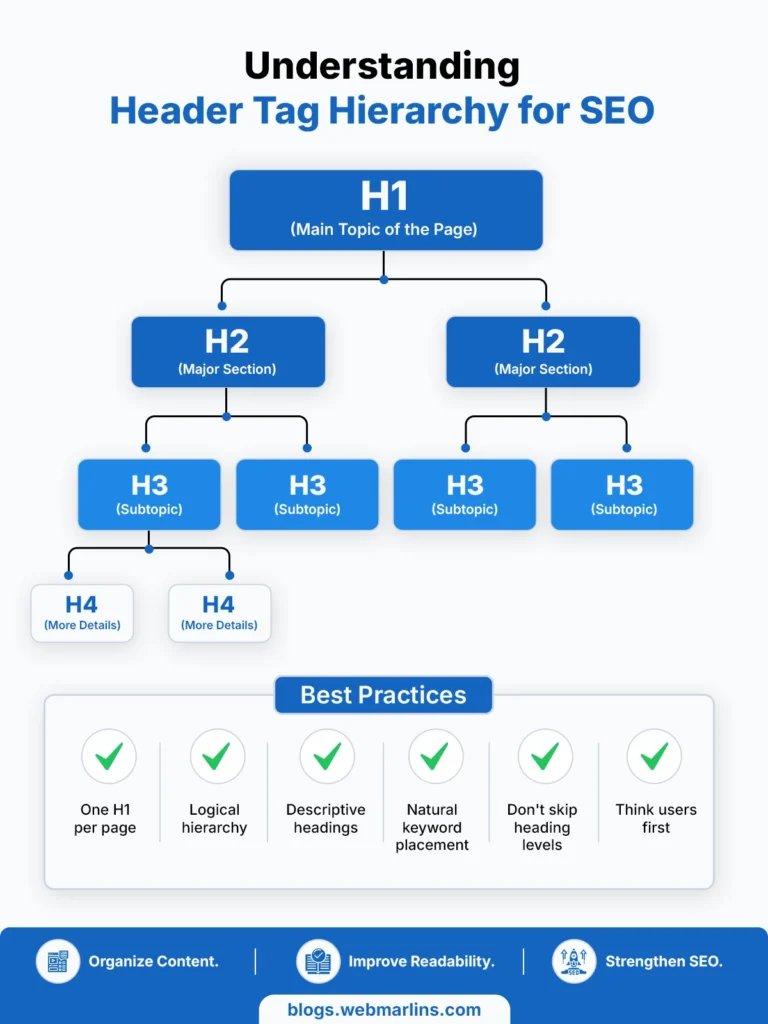
A properly structured article typically looks like this:
H1
├── H2
│ ├── H3
│ ├── H3
├── H2
│ ├── H3
│ ├── H4
├── H2
Each heading should naturally expand on the topic introduced by its parent heading.
Poor hierarchy can confuse readers and reduce the clarity of your content.
H1 Tag Explained
The H1 tag represents the primary topic of the page.
Every page should have one clear H1 that accurately describes what users will learn.
Example
<h1>Header Tags SEO: Complete Guide</h1>
Best Practices for H1
- Use one primary H1 for the page.
- Include the primary keyword naturally.
- Make it descriptive and compelling.
- Match the user’s search intent.
- Avoid keyword stuffing.
- Keep it concise and easy to understand.
A strong H1 immediately tells users and search engines what the page is about.
H2 Tags Explained
H2 headings divide your article into major sections.
Think of them as chapters in a book.
Examples for this guide include:
- What Are Header Tags?
- Why Header Tags Matter
- Best Practices
- Common Mistakes
- FAQs
Each H2 should introduce a distinct topic that supports the overall subject of the page.
H3 Tags Explained
H3 headings further break down the information within an H2 section.
For example:
H2: Best Practices
H3: Use Only One H1
H3: Include Keywords Naturally
H3: Maintain Logical Hierarchy
This layered structure helps users scan content quickly and allows search engines to better understand topic relationships.
What About H4, H5, and H6?
Many articles never require headings beyond H3.
However, for highly technical documentation or long-form guides, deeper levels of organization can improve clarity.
Example:
H2 Best Practices
H3 Content Structure
H4 Writing Better H2s
H4 Optimizing H3s
H3 Accessibility
Avoid adding deeper heading levels unless they genuinely improve readability.
Header Tags vs. Title Tag
One of the most common SEO misconceptions is confusing the H1 tag with the page title.
Although they often contain similar wording, they serve different purposes.
| Feature | H1 Tag | Title Tag |
| Visible on page | Yes | Usually no |
| Appears in Google Search | Rarely | Yes |
| Helps users understand the page | Yes | Yes |
| Used in browser tabs | No | Yes |
| Primary SEO role | Content structure | Search result optimization |
A good practice is to make your title tag more click-worthy while keeping your H1 focused on the page topic.
For example:
Title Tag
Header Tags SEO Guide (2026): Best Practices, Examples & Tips
H1
Header Tags SEO: The Complete Guide to H1, H2 & H3 Tags
Both support SEO but serve different purposes.
Do Keywords Need to Be in Header Tags?
Yes—but naturally.
Google understands context and semantic relationships far better than it did years ago. Instead of forcing the exact keyword into every heading, write descriptive headings that accurately explain the content.
For example, rather than repeating “header tags SEO” in every H2, you can use related phrases such as:
- Why Heading Structure Matters
- Common H1 Mistakes
- Organizing Content for Better Rankings
- Best Practices for SEO Headings
This creates a more natural reading experience while still reinforcing topical relevance.
Header Tags SEO Best Practices
Now that you understand what header tags are and how they work, let’s explore the strategies that can make your content more useful for readers and easier for search engines to interpret.
Following these best practices won’t guarantee first-page rankings, but they help create a strong on-page SEO foundation while improving readability, accessibility, and topical relevance.
1. Use One Clear H1 for Every Page
The H1 tag should represent the main topic of your page.
While modern HTML5 allows multiple H1 tags in certain contexts, using one primary H1 remains the clearest and most widely recommended approach for both users and SEO.
For example, if your article targets header tags seo, your H1 could be:
<h1>Header Tags SEO: The Complete Guide to H1, H2 & H3 Tags</h1>
A focused H1 immediately tells visitors what the page is about and sets expectations for the rest of the content.
2. Follow a Logical Heading Hierarchy
Headings should flow naturally from one level to the next.
A good structure looks like this:
H1 Header Tags SEO
H2 What Are Header Tags?
H3 H1 Tag
H3 H2 Tag
H3 H3 Tag
H2 Best Practices
H3 Write Descriptive Headings
H3 Include Keywords Naturally
H2 Common Mistakes
Avoid jumping directly from an H2 to an H4 unless there’s a clear structural reason. Consistent hierarchy makes your content easier to follow for readers, search engines, and assistive technologies.
3. Write Headings for Humans First
A common mistake is writing headings solely for search engines.
For example:
❌ Bad Example
Header Tags SEO Header Tags SEO Best Header Tags SEO Tips
✅ Better Example
How to Use Header Tags Without Over-Optimizing Your Content
Descriptive headings improve readability and naturally incorporate relevant keywords without sounding repetitive.
4. Include Your Primary Keyword Naturally
Your primary keyword should appear in:
- The H1
- At least one H2 (where relevant)
- Occasionally in supporting H3s if it fits naturally
There’s no need to force the exact keyword into every heading.
Instead of repeating header tags seo, use semantically related phrases such as:
- SEO heading structure
- HTML heading tags
- Heading hierarchy
- On-page SEO headings
- H1 tag optimization
- Content organization
This creates a richer topical signal while keeping the article natural.
5. Keep Headings Descriptive
Each heading should clearly summarize the section beneath it.
Compare these examples:
❌ Poor Heading
Important Things
✅ Better Heading
Common Header Tag Mistakes That Can Hurt Your SEO
The second example immediately communicates what readers will learn.
6. Match Search Intent
Every heading should answer a question users actually have.
Someone searching for header tags seo typically wants to know:
- What are header tags?
- How do they affect SEO?
- What is the correct heading hierarchy?
- How many H1 tags should a page have?
- What mistakes should be avoided?
Structuring your headings around these questions increases the likelihood of satisfying search intent.
7. Keep Headings Concise
Long headings reduce readability.
Aim for headings that are informative yet easy to scan.
For example:
❌
Everything You Need to Know About Using Header Tags Correctly for Search Engine Optimization
✅
How to Use Header Tags for SEO
Readers often skim before deciding whether to continue reading. Clear headings improve engagement.
Common Header Tag Mistakes
Even well-written content can lose clarity if heading tags are used incorrectly.
Here are some of the most common mistakes to avoid.
Using Headings Only for Styling
Some website owners use H2 or H3 tags simply because they like the font size.
Headings should indicate document structure—not act as design elements.
If you need larger text, adjust your CSS instead of changing the heading level.
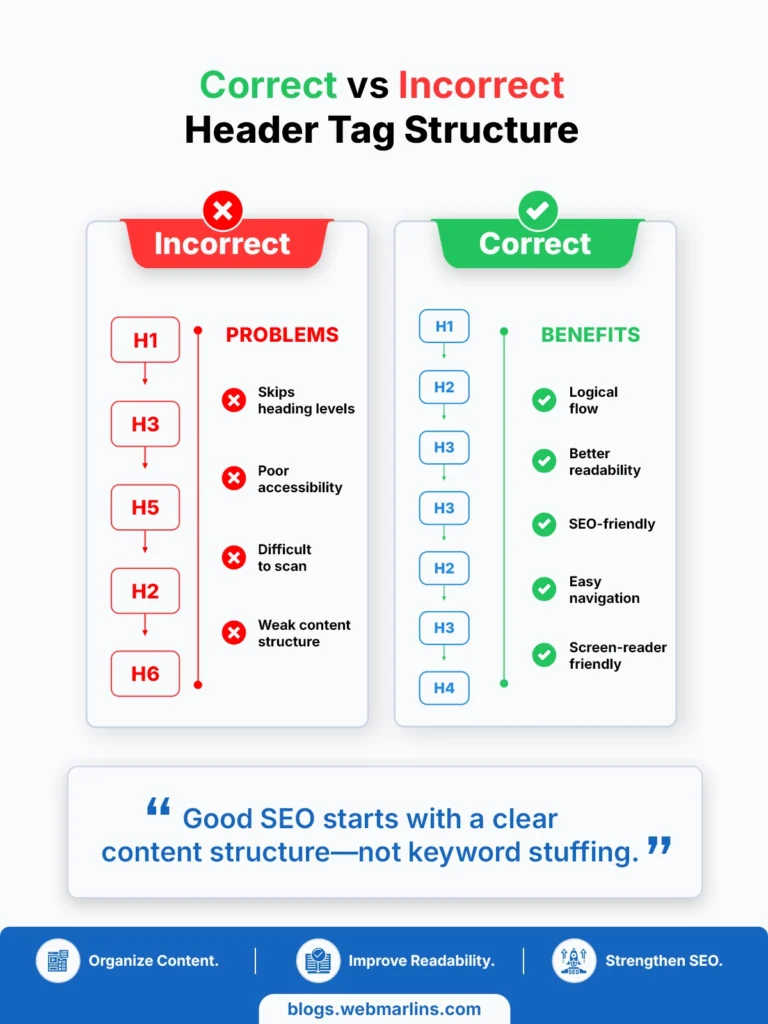
Skipping Heading Levels
Avoid structures like:
H1
H3
H5
Instead, organize headings logically.
H1
H2
H3
H4
Consistency improves both usability and accessibility.
Stuffing Keywords into Every Heading
Keyword stuffing doesn’t improve rankings.
Instead of:
Header Tags SEO Tips Header Tags SEO Guide Header Tags SEO Best Practices
Write headings naturally.
Best Practices for Organizing Your Content
Google understands semantic relationships, so repetitive keyword usage is unnecessary.
Multiple Unrelated H1 Tags
Using several unrelated H1 tags can dilute the page’s focus.
If your page covers one main topic, one primary H1 remains the clearest approach.
Vague Headings
Avoid headings such as:
- Overview
- More Information
- Details
- Miscellaneous
These don’t help readers or search engines understand the content.
Instead, write descriptive headings that summarize the section.
Real-World Example of Good Heading Structure
Imagine you’re writing a guide on Local SEO.
A poor structure might look like:
H1 Local SEO
H2 Tips
H2 More Tips
H2 Other Things
A stronger structure would be:
H2 What Is Local SEO?
H2 Why Local SEO Matters
H2 Google Business Profile Optimization
H2 Local Keyword Research
H2 Citation Building
H2 Common Local SEO Mistakes
H2 Frequently Asked Questions
Each heading clearly communicates its purpose, making the article easier to navigate.
Header Tags and Featured Snippets
Google often extracts information from well-structured content to generate featured snippets.
For example, if your article includes a heading like:
What Are Header Tags?
Followed immediately by a concise definition, Google can easily identify that section as a potential snippet.
Similarly, headings beginning with:
- What
- Why
- How
- When
- Best Practices
- Benefits
- Examples
often align with informational search intent and increase the likelihood of appearing in featured snippets.
To improve your chances:
- Answer the question immediately after the heading.
- Keep the first paragraph concise.
- Use bullet points or numbered lists where appropriate.
- Support answers with examples.
Header Tags and AI Search
As AI-powered search experiences continue to evolve, content structure has become even more important.
Large language models and AI-generated search summaries rely on clear organization to understand relationships between topics.
Well-structured headings help AI systems identify:
- Main topics
- Supporting concepts
- Step-by-step instructions
- Definitions
- Comparisons
- FAQs
For example, an article with clearly defined sections such as:
What Are Header Tags?
Why They Matter
Best Practices
Common Mistakes
FAQs
is much easier for AI systems to interpret than an article consisting of long, unstructured paragraphs.
Rather than writing for algorithms, focus on creating content that is logically organized and genuinely helpful.
Header Tags and Accessibility
Header tags are not just beneficial for SEO—they also improve accessibility.
Many people using screen readers navigate pages by jumping between headings rather than reading every line of text.
A logical heading hierarchy helps users:
- Understand page structure
- Navigate quickly
- Find relevant sections
- Skip repetitive content
Poor heading structures can make navigation confusing, especially for users relying on assistive technologies.
Creating accessible content also improves the overall user experience for everyone.
Header Tags for Blog Posts
Most blog articles naturally follow a structure like this:
H1 Blog Title
H2 Introduction
H2 Main Topic
H3 Explanation
H3 Examples
H2 Best Practices
H2 Common Mistakes
H2 FAQs
H2 Conclusion
This format keeps articles organized while helping readers locate information quickly.
Header Tags for E-commerce Pages
Heading tags are equally important for product and category pages.
For example:
H1 Men’s Running Shoes
H2 Features
H2 Specifications
H2 Benefits
H2 Customer Reviews
H2 Frequently Asked Questions
A structured layout improves usability and makes product pages easier to scan.
Header Tags for Local SEO
Local businesses should also use descriptive heading structures.
Example:
H1 Best SEO Agency in Delhi
H2 Our SEO Services
H2 Why Choose Web Marlins
H2 Industries We Serve
H2 Client Success Stories
H2 Frequently Asked Questions
H2 Contact Us
This organization helps users quickly find location-specific information while reinforcing the page’s topical relevance.
Header Tags SEO Checklist
Before publishing any page or blog post, use this checklist to ensure your heading structure is optimized for both users and search engines.
Content Structure Checklist
- ✅ Use one clear H1 that accurately describes the page.
- ✅ Organize content with logical H2 and H3 headings.
- ✅ Include your primary keyword naturally in the H1.
- ✅ Add secondary keywords where they fit naturally.
- ✅ Write descriptive headings instead of generic labels.
- ✅ Keep heading levels sequential whenever possible.
- ✅ Avoid using headings only for visual styling.
- ✅ Ensure each section delivers on the promise made in its heading.
- ✅ Answer important user questions under dedicated headings.
- ✅ Review headings for readability before publishing.
Following this checklist helps create content that’s easier to understand, easier to scan, and more likely to satisfy user intent.
H1 vs H2 vs H3: Quick Comparison
| Heading | Purpose | Best Practice |
| H1 | Main topic of the page | Use one descriptive H1 containing the primary keyword naturally. |
| H2 | Major sections | Break the page into logical topics that support the H1. |
| H3 | Subsections | Expand on the ideas introduced under each H2. |
| H4–H6 | Additional organization | Use only when the content genuinely requires deeper structure. |
Remember that headings are meant to communicate hierarchy—not simply change the size of text.
Example of an SEO-Friendly Heading Structure
Here’s a practical example of how a long-form article can be organized.
H1 Header Tags SEO: Complete Guide
H2 What Are Header Tags?
H2 Why Header Tags Matter
H2 Understanding H1, H2 and H3
H3 H1 Tag
H3 H2 Tag
H3 H3 Tag
H2 Header Tag Best Practices
H2 Common Mistakes
H2 Header Tags for AI Search
H2 Frequently Asked Questions
H2 Conclusion
This structure makes the page easy to navigate while helping search engines understand how topics relate to one another.
HTML Example
A clean HTML structure is simple and effective.
<article>
<h1>Header Tags SEO: Complete Guide</h1>
<h2>What Are Header Tags?</h2>
<p>…</p>
<h2>Why Header Tags Matter</h2>
<p>…</p>
<h3>Better Readability</h3>
<p>…</p>
<h3>Improved Accessibility</h3>
<p>…</p>
<h2>Best Practices</h2>
<p>…</p>
</article>
The focus should always be on creating a logical flow rather than adding unnecessary heading levels.
Common Myths About Header Tags
Myth: More H1 tags mean better rankings.
Reality: Multiple H1 tags don’t automatically improve SEO. Clear content structure is far more important than the number of H1 elements.
Myth: Every heading needs an exact-match keyword.
Reality: Search engines understand synonyms and context. Write headings for people first, then optimize naturally.
Myth: Heading tags alone improve rankings.
Reality: Strong rankings result from a combination of helpful content, search intent alignment, page experience, authority, internal linking, and technical SEO.
How to Check Header Tags on Any Website
Whether you’re auditing your own website or analyzing a competitor’s page, checking header tags is a quick way to understand how the content is structured. You don’t need advanced technical skills—there are several simple methods you can use.
Method 1: Use Your Browser’s Inspect Tool
Every modern browser includes built-in developer tools that let you view a page’s HTML structure.
Steps:
- Open the webpage you want to analyze.
- Right-click anywhere on the page.
- Select Inspect (or press F12 on Windows or Option + Command + I on Mac).
- Press Ctrl + F (Windows) or Command + F (Mac) within the Elements panel.
- Search for <h1>, <h2>, or <h3> to locate the page’s heading tags.
This method lets you verify whether the page has a single H1, how H2 and H3 tags are organized, and whether the heading hierarchy follows SEO best practices.
Method 2: Use SEO Browser Extensions
If you regularly perform SEO audits, browser extensions can save time by displaying all heading tags with a single click.
Popular options include:
- Detailed SEO Extension
- SEO Minion
- Web Developer Extension
- Ahrefs SEO Toolbar
- MozBar
These tools typically show:
- All H1–H6 headings
- Heading hierarchy
- Meta title and description
- Canonical URL
- Image alt attributes
- Internal and external links
For quick competitor analysis, browser extensions are often faster than manually inspecting the page source.
Method 3: View the Page Source
You can also inspect the HTML source directly.
Steps:
- Right-click on the webpage.
- Select View Page Source.
- Press Ctrl + F (Windows) or Command + F (Mac).
- Search for <h1>, <h2>, <h3>, or other heading tags.
This approach is useful for confirming the actual HTML rendered on the page.
What to Look for During a Header Tag Audit
When reviewing a webpage, check for the following:
- Does the page have one clear and descriptive H1?
- Is the H1 relevant to the page’s primary topic?
- Are H2 headings used to divide the main sections?
- Do H3 headings logically expand on their parent H2 sections?
- Are heading levels used sequentially without unnecessary skipping?
- Do headings accurately describe the content beneath them?
- Are keywords included naturally instead of being overused?
- Is the overall structure easy for users to scan?
Pro Tip
Don’t just count heading tags—evaluate their quality. A page with one H1 and ten H2 tags won’t perform well if the headings are vague, repetitive, or don’t match user intent. The best heading structures guide readers through the content naturally while helping search engines understand the page’s topical organization.
Frequently Asked Questions
What are header tags in SEO?
Header tags are HTML heading elements (H1–H6) used to organize page content into a logical hierarchy. They help users scan content and help search engines understand the relationship between different sections.
Do header tags help SEO?
Yes. While heading tags are not a direct ranking factor on their own, they improve content organization, readability, accessibility, and topical clarity—all of which contribute to stronger on-page SEO.
How many H1 tags should a page have?
For most websites, one clear H1 per page is the recommended approach because it keeps the page focused on a single primary topic.
Can a page have multiple H1 tags?
Modern HTML allows multiple H1 elements in certain contexts, but for clarity and consistency, using one primary H1 remains the best practice for most websites.
Should the H1 contain the primary keyword?
Yes, if it fits naturally. Including your primary keyword in the H1 helps reinforce the page’s topic, but avoid forcing or repeating it unnaturally.
What’s the difference between an H1 tag and a title tag?
The H1 is the main heading users see on the page, while the title tag is primarily displayed in search results and browser tabs. Both are important but serve different purposes.
Are H2 tags important for SEO?
Yes. H2 tags divide content into major sections, making it easier for readers and search engines to understand the page structure.
Are H3 tags necessary?
H3 tags are useful when you need to organize information under an H2. They aren’t required on every page, but they improve clarity in longer articles.
Can I skip from H2 directly to H4?
It’s generally better to maintain a logical hierarchy. Skipping heading levels can make content more difficult to understand, especially for assistive technologies.
Should every heading contain a keyword?
No. Write headings that accurately describe the section. Use keywords naturally where appropriate rather than trying to include them in every heading.
Do heading tags improve accessibility?
Yes. Screen readers often use headings to help users navigate a page quickly, making a logical heading structure an important accessibility feature.
Are header tags still important in 2026?
Absolutely. As search engines and AI systems continue to prioritize well-structured, helpful content, clear heading hierarchies remain an important part of technical and on-page SEO.
Key Takeaways
Header tags do much more than organize text. They create a logical framework that improves readability, accessibility, topical relevance, and the overall user experience.
An effective heading strategy should:
- Focus on users before search engines.
- Use one clear H1.
- Organize content with meaningful H2 and H3 headings.
- Maintain a logical hierarchy.
- Answer real user questions.
- Support related topics with descriptive subheadings.
- Avoid keyword stuffing and unnecessary complexity.
When combined with high-quality content, thoughtful internal linking, and sound technical SEO, well-structured header tags contribute to a stronger, more useful website.
Conclusion
Header tags remain a fundamental part of modern SEO because they help both people and search engines understand your content. A well-organized heading structure improves readability, supports accessibility, clarifies topical relationships, and makes it easier for users to find the information they need.
Rather than treating heading tags as a place to repeat keywords, think of them as the outline of your content. Every H2 should introduce a meaningful section, every H3 should expand on that topic, and the entire page should follow a logical flow that satisfies search intent.
As search evolves toward AI-powered experiences and increasingly values helpful, well-structured content, pages with clear heading hierarchies are better positioned to communicate their expertise. By applying the best practices in this guide, you’ll create content that’s easier to read, easier to navigate, and better equipped to support your long-term SEO goals.

Amir Siddiqui is a Digital Marketing Expert and SEO Specialist with over 8 years of experience helping businesses grow through data-driven digital marketing strategies. As the Founder of Web Marlins Pvt. Ltd., his core expertise lies in Search Engine Optimization (SEO), including Technical SEO, Local SEO, AI SEO, and content strategy. He has helped businesses across India, the USA, and the UAE improve search rankings, increase organic traffic, and generate high-quality leads through sustainable, results-focused SEO solutions.